Barcode sales, cashiers, returns, customer tabs and end of day in one place. Stock is shared with your online store and marketplaces, and there is nothing to install.
Sale completeS-261110-0043 · CardSales tax included
POS
Everything your shop needs
Boutiques, grocery stores, toy stores, hardware stores: every shop that sells at the counter.
Barcode sales
Scan it and it lands on the receipt. Items without a barcode are found with a tap or by name.
One stock count
An item sold in the shop comes off your online store and your marketplaces at the same time.
Cashiers and PINs
Every employee signs in with a personal PIN, and you set the discount limit.
Returns and exchanges
Returns by receipt number: money back the way it was paid, or store credit.
Customer tabs
A customer's balance goes on their account and is collected at the register.
End of day
Opening and closing counts, the difference, and a report by payment type.
Sales tax
State and local sales tax is added to every sale from the rates you set.
Receipt printer
Receipts from 58 and 80 mm thermal printers, and the cash drawer opens with the printer.
Register link
Employees never enter your panel; they open the register from a bookmark on their own device.
Sell in seconds with a barcode
Scan or tap a product and it lands on the receipt. Discounts, holds, change and receipt printing are on the same screen.
Works as soon as you plug in a barcode scanner
A manager PIN is required when a cashier goes over the discount limit
F2 to search, F9 to complete the sale
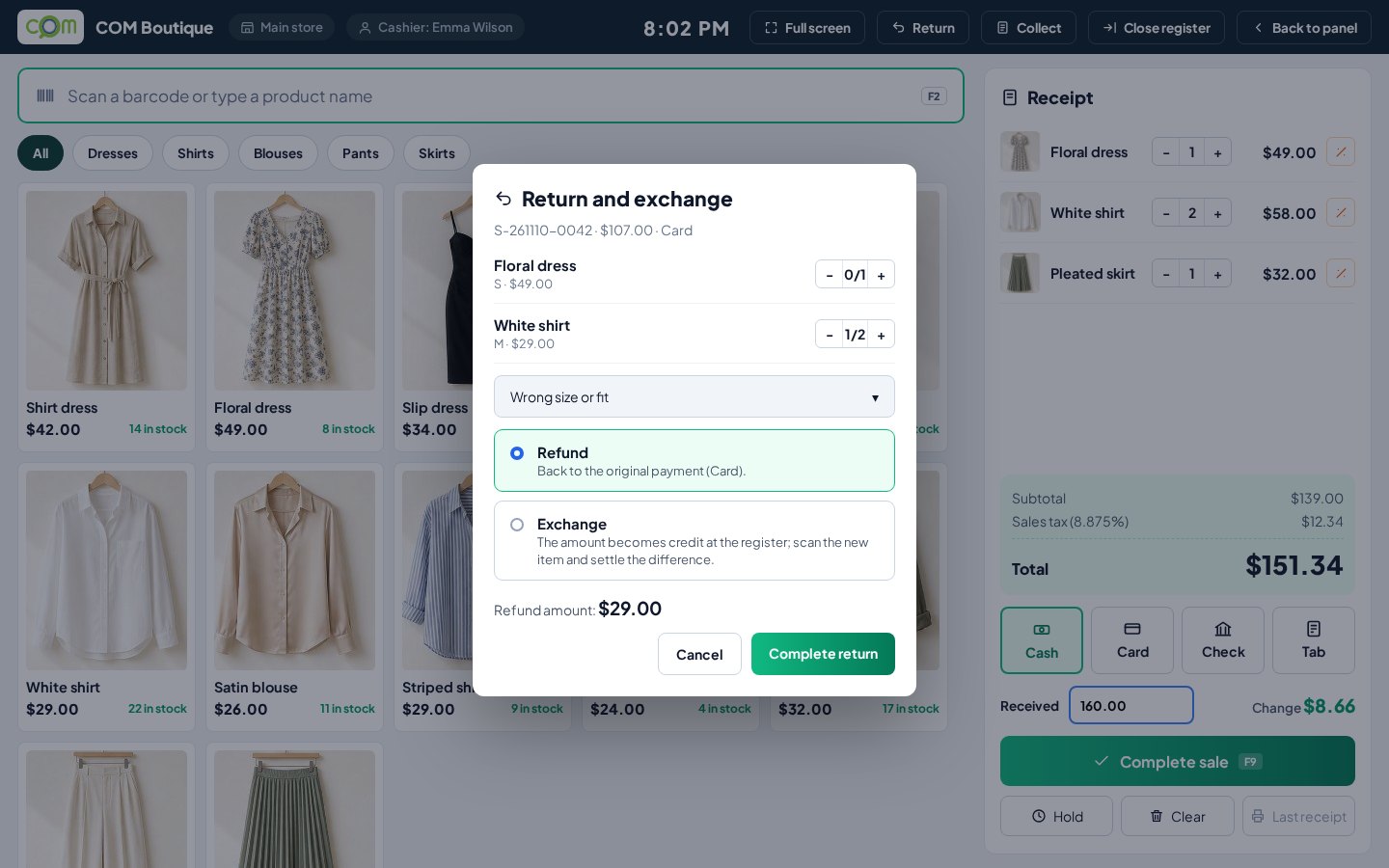
Returns and exchanges by receipt number
Scan the number on the receipt, then pick the item, quantity and reason. The money goes back the way it was paid, or the amount becomes credit for an exchange.
No more can be returned than was sold
Stock goes back automatically
Manager approval for cashier returns
Customer tabs, without paper
Pick the customer and the sale goes on their tab. When they come to pay, take it with the Collect button at the top; the remaining balance is printed on the receipt.
Customers are the accounts in your bookkeeping
Cashiers never see phone numbers or tax IDs
Cash collected counts in the end of day
End of day at a glance
The cashier counts the drawer at opening and again at closing, and the difference is calculated for you. Cash, card, check and tabs each have their own total.
Only you see the sales total
History session by session
Sales go to your books automatically
Questions
Frequently asked questions
Do I need a separate cash register?
No. COM POS runs in a web browser on a computer or tablet, so there is no register hardware to buy. Sales tax is added to every sale from the rates you set for your state and city, and you can keep your current register alongside COM if you prefer.
Which devices does it work on?
It runs in a web browser on a computer or tablet, with nothing to install. You can use a USB barcode scanner, a 58 or 80 mm thermal receipt printer and a cash drawer connected to the printer.
Do my employees get into my panel?
No. You create a separate link for each register device; the employee opens the register from that link and signs in with their own PIN. When you delete the link, the register on that device closes.
Is stock shared with my online store?
Yes. An item sold at the register comes out of the same stock as your online store, Amazon, eBay and Etsy, and a returned item goes back into stock.
What happens if the internet goes down?
The register works with an internet connection. If the connection drops, you can keep selling by sharing your phone's internet.
 COM Boutique
 Floral dress$49.00
 Slip dress$34.00
 Wrap dress$59.00
 White shirt$29.00
 Satin blouse$26.00
 Pleated skirt$32.00